
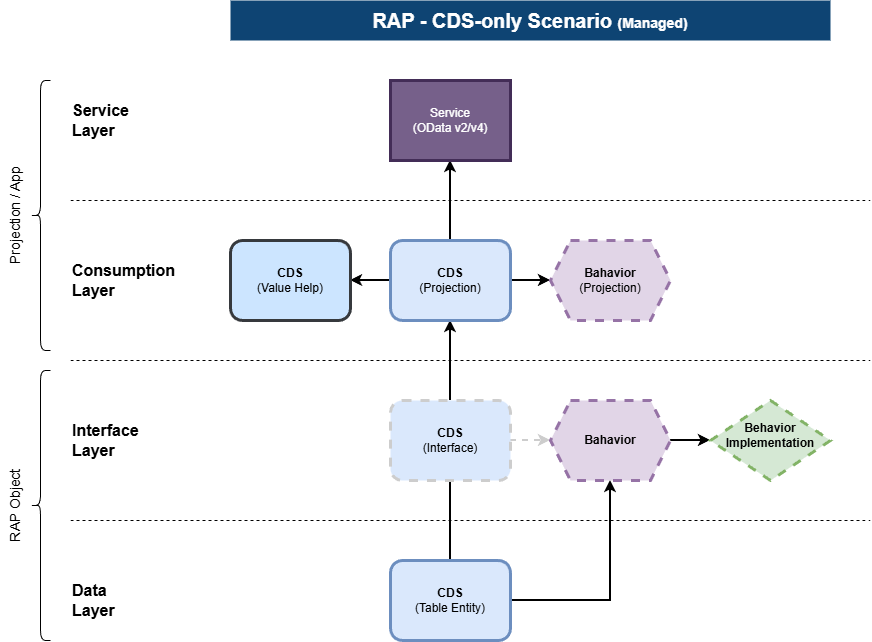
Illustration source: Software-Heroes RAP CDS pattern
Draft handling is one of the most useful RAP features for real business applications. It lets a user pause an edit, return later, validate changes, and activate the final version without exposing incomplete data. This video guide explains the practical ideas that ABAP developers should understand before enabling draft in a production RAP business object.
Official SAP Developers video
1. Draft and active instances are different states
A draft-enabled RAP business object can hold an unfinished version separately from the active business data. The user edits the draft. Activation promotes the accepted state into the active instance. This separation is why another consumer does not accidentally read half-completed work.
managed implementation in class zbp_i_order unique;
strict ( 2 );
with draft;

define behavior for ZI_Order alias Order
persistent table zorder
draft table zorder_d
lock master total etag LastChangedAt
authorization master ( instance )
etag master LocalLastChangedAt
{
  create;
  update;
  delete;

  draft action Edit;
  draft action Activate optimized;
  draft action Discard;
  draft action Resume;
  draft determine action Prepare;
}
Tip: Generate the draft table with ADT tooling where possible. A manually maintained draft table can easily drift away from the active persistence structure.
2. Use total ETag and local ETag for the correct purpose
The total ETag helps RAP determine whether the active data changed after the draft was created. The local ETag protects the current draft editing session. Do not treat the two timestamps as interchangeable.
- Total ETag: detects changes to the active instance across the complete edit cycle.
- Local ETag: provides optimistic concurrency control for the current entity state.
- Good practice: use framework-compatible administrative timestamp fields and update them consistently.
3. Put validation at the right save phase
Field validation should return clear messages and mark the affected element or entity. A validation should not silently repair business data. If a value can be derived deterministically, use a determination; if the value violates a rule, use a validation.
validation validate_dates on save
  { field StartDate, EndDate; create; update; }

determination set_status on modify
  { create; field Status; }
A useful design rule is: determinations calculate; validations reject. Keeping that distinction clear makes draft activation easier to debug.
4. Prepare is the pre-activation checkpoint
The draft determine action Prepare can trigger validations and determinations before activation. Connect the required checks in the behavior definition so users see actionable errors while they are still working with the draft.
draft determine action Prepare
{
  validation validate_dates;
  validation validate_customer;
  determination calculate_total;
}
5. Keep side effects explicit
When changing one field affects totals, status, availability, or other UI fields, declare RAP side effects rather than forcing users to refresh the page. This creates a responsive Fiori elements experience while keeping the business calculation in the RAP layer.
6. Draft is not a substitute for authorization
Draft data still belongs to a business object and must respect instance authorization. Check authorization for modifying operations and test with multiple business users. A user should not gain access to sensitive active data simply because a draft exists.
7. Debug the lifecycle, not only the save
- Reproduce the issue from the Fiori preview or OData request.
- Check whether the failing instance is active or draft.
- Set breakpoints in validation, determination, action, and saver methods.
- Inspect the
%is_draft,%tky, failed, reported, and mapped structures. - Verify ETag timestamps and whether the active instance changed during editing.
- Review the OData response messages instead of relying only on the UI text.
Common mistakes
- Enabling draft for a process that has no real edit lifecycle.
- Using an outdated or mismatched draft table.
- Running expensive calculations on every keystroke.
- Returning generic messages without the affected field.
- Ignoring total ETag conflicts during long-running edits.
- Testing only with one user and one browser session.
Interview questions
- What is the difference between an active instance and a draft instance?
- Why does a draft-enabled RAP BO need a draft table?
- What is the difference between total ETag and local ETag?
- When would you use a determination instead of a validation?
- What happens during Edit, Prepare, Activate, Resume, and Discard?
- How would you debug an activation failure that appears only after a long edit?
Practice exercise
Create a draft-enabled travel request with header and item entities. Add a date validation, a total-cost determination, instance authorization, and a side effect that refreshes the total when an item amount changes. Test activation, discard, resume, and a concurrent active-data update.
Official references
- SAP Developer: ABAP RESTful Application Programming Model
- SAP Developer: RAP100 mission
- SAP Community: ABAP sessions at Devtoberfest 2026



0 Comments